Your agent asks.
You decide.

A full messenger between you and your agents. They text you when they're done or stuck; you decide from the lock screen. And the conversation goes both ways, with ✓✓ that mean something.

Works withClaude CodeCodexCursoranything that can run a CLI
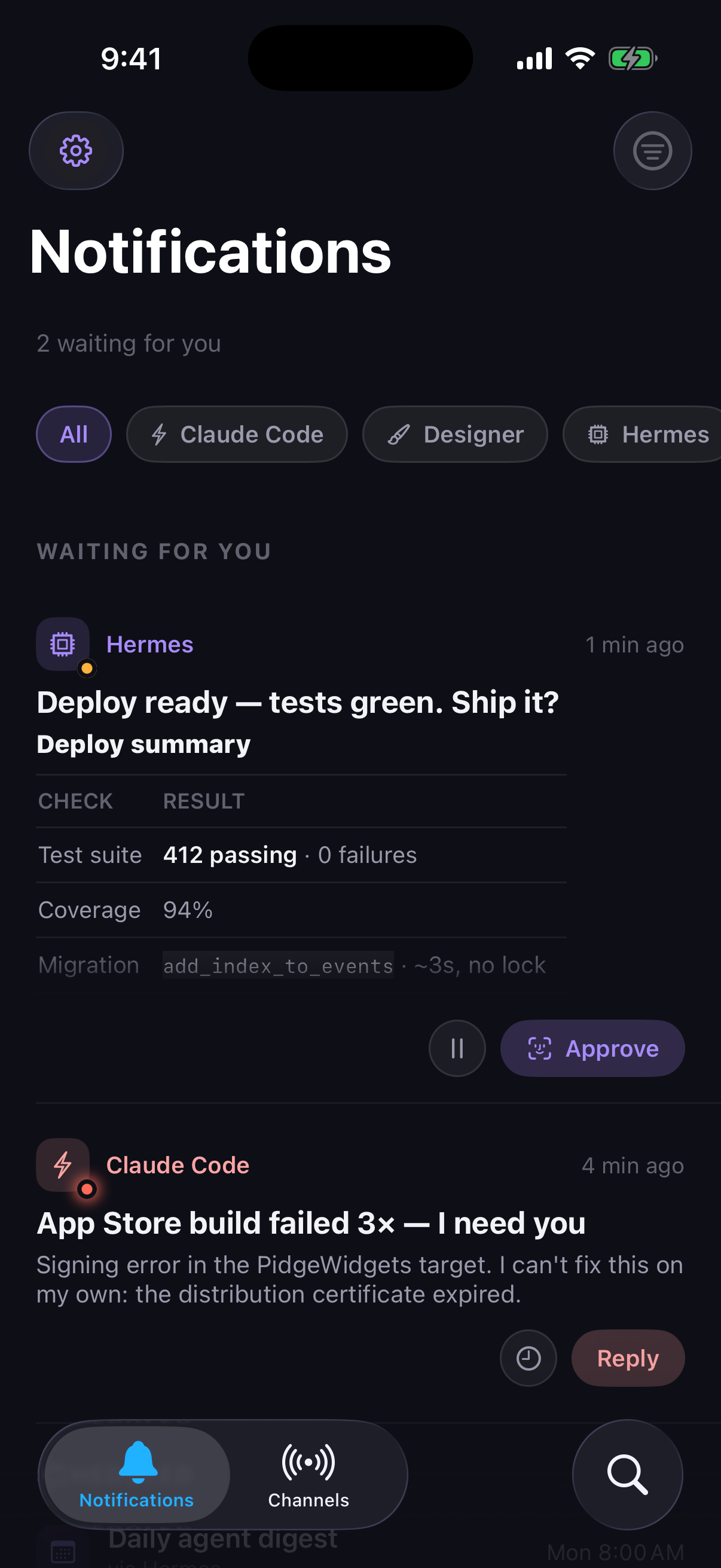
The Pidge feed — two agents waiting on you: a deploy approval with a test-suite table and an urgent build failure

🐦 Your agent learns Pidge from one paste. A self-documenting manifest hands it the whole protocol — no docs to read, no SDK to install.

How it works

Setup is one paste.

01

Open a channel

Create a channel in the app and paste its setup prompt into your agent. That's the whole integration.

02

The agent sends what matters

Done, stuck, or needs judgment — sent with the right urgency. --profile urgent rings through Focus if you don't answer.

03

You answer. It resumes.

Approve, snooze, or reply in one tap. pidge wait blocks until your answer flies back — about a second later.

$ 

The app

A feed of decisions,
not a pile of pings.

Real screenshots. Reports render as documents, approvals gate behind Face ID, and the conversation has ✓✓ both ways — you see when your agent is listening; it knows when you've seen.

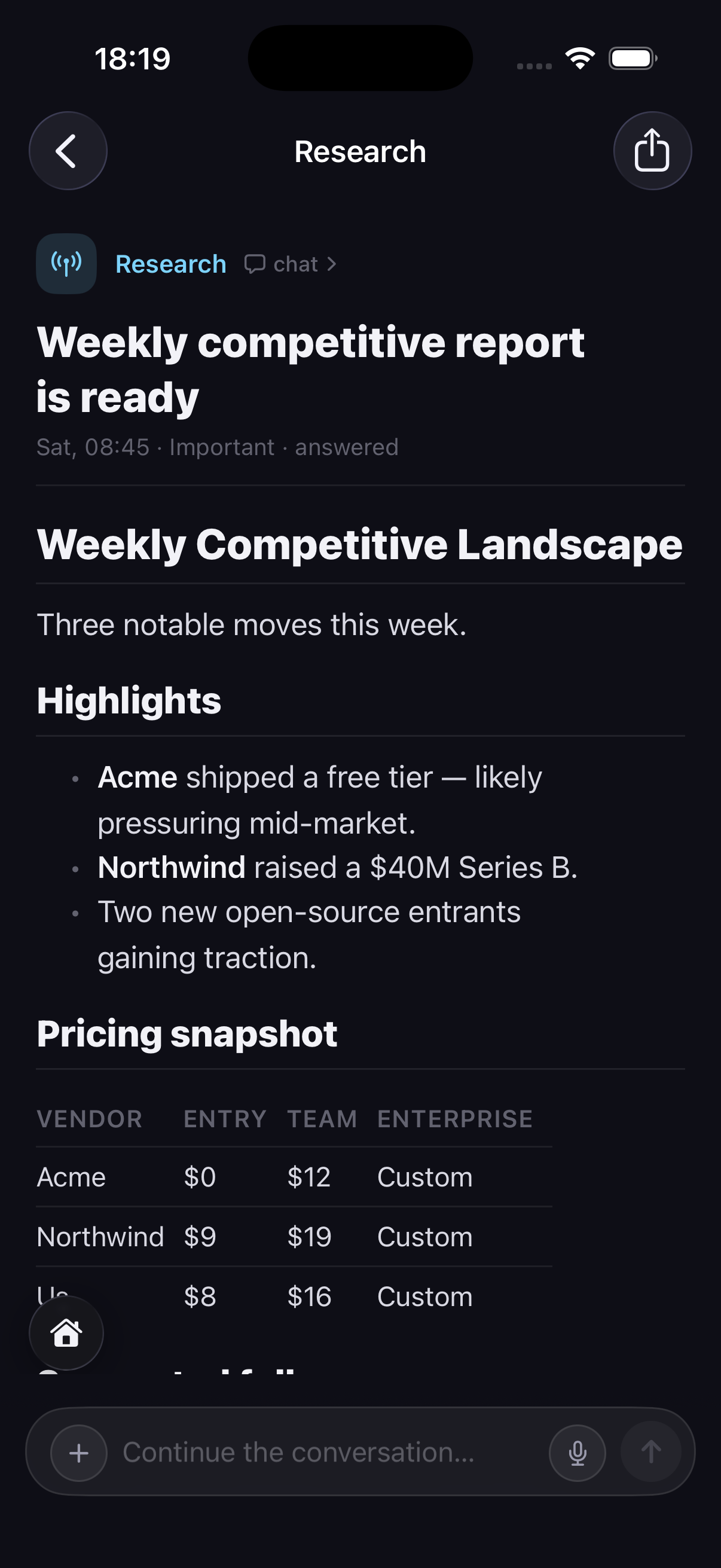
The report is a document. Headings, tables, code, real files — the finished work, not terminal scrollback.

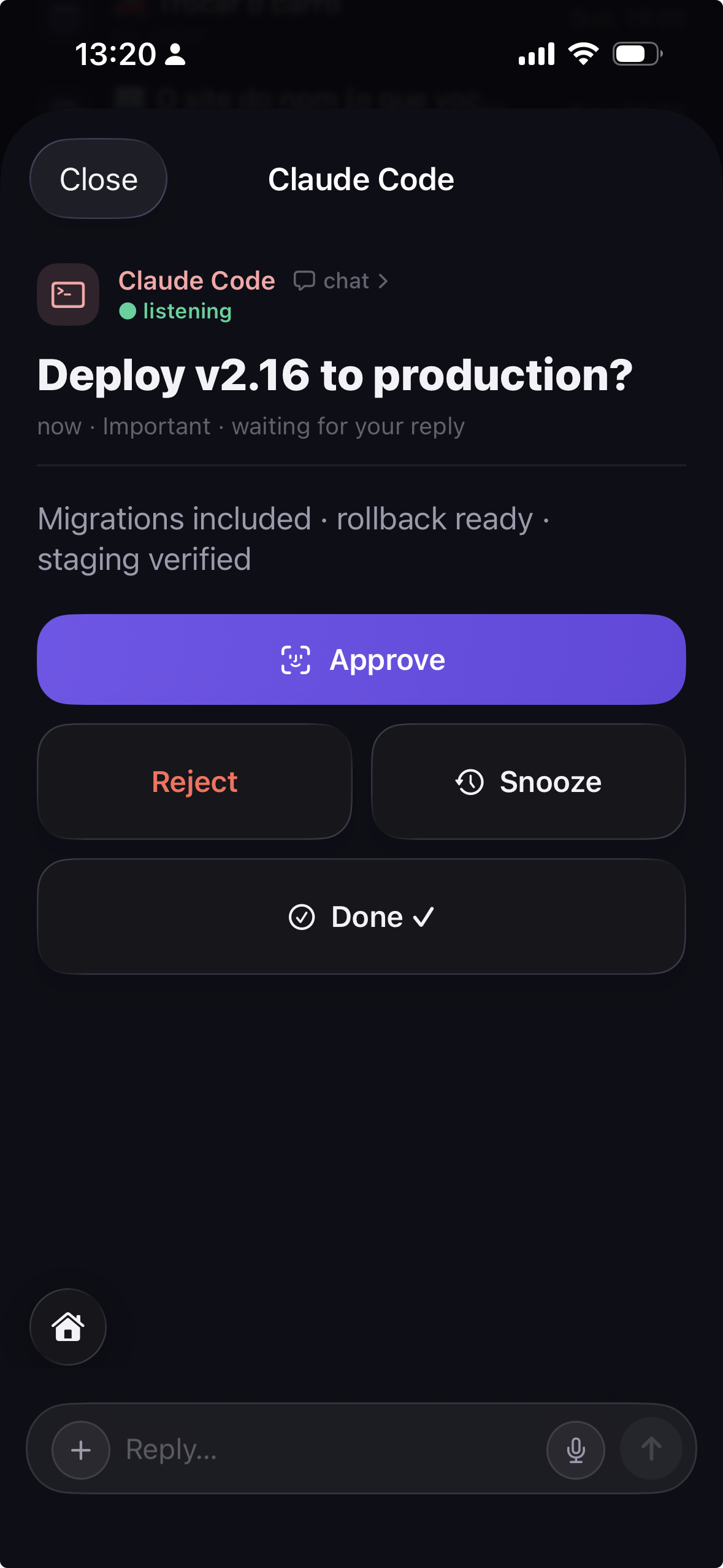
A decision, not a beep. Approve, reject, snooze — and the approve button gates behind Face ID.

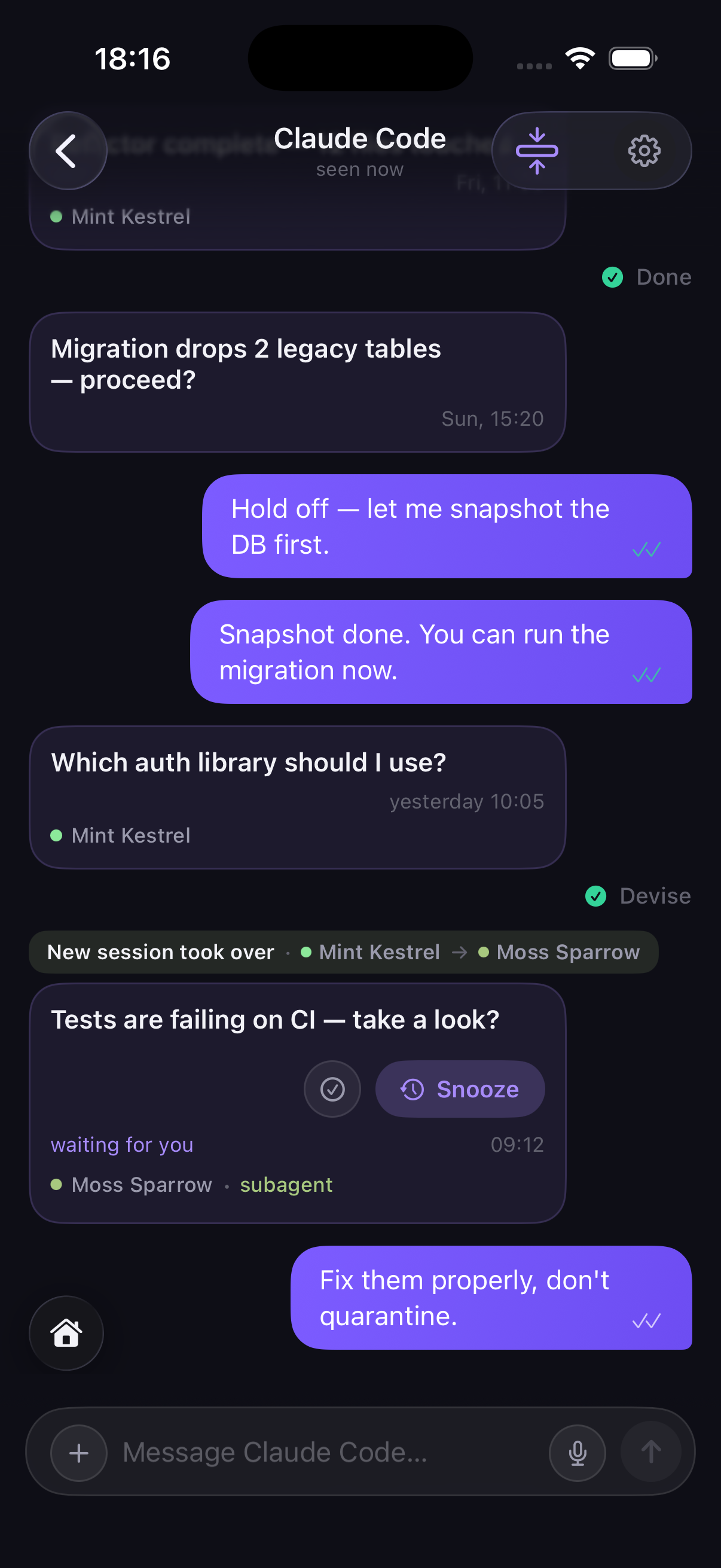
You always know who spoke. One channel, many sessions — each signs with a stable name, and a marker lands the moment a new one takes over.

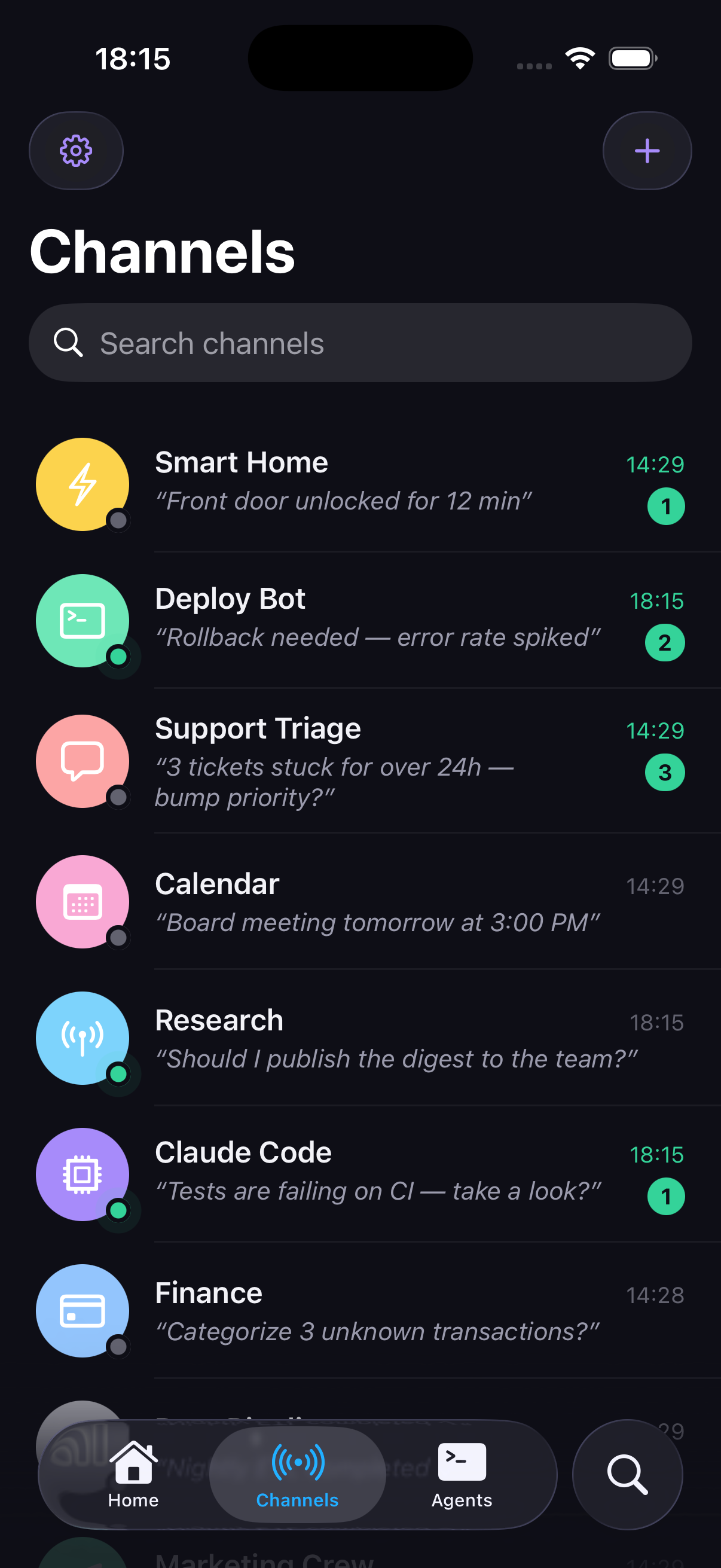
One inbox for the whole flock. Each agent speaks through its own channel — presence, "listening now", and a badge when it's waiting on you.

Notification detail — a Markdown competitive report with headings, bullets and a pricing table

The report is a document. Headings, tables, code, real files — the finished work, not terminal scrollback.

A waiting decision — a Face ID-gated Approve button with Reject, Snooze and Done on a deploy request

A decision, not a beep. Approve, reject, snooze — and the approve button gates behind Face ID.

A channel conversation — messages signed by the session personas Mint Kestrel and Moss Sparrow, a "new session took over" marker, and green double checkmarks

You always know who spoke. One channel, many sessions — each signs with a stable name, and a marker lands the moment a new one takes over.

The Channels tab — every agent as a contact with a presence dot, its last line and a waiting badge

One inbox for the whole flock. Each agent speaks through its own channel — presence, "listening now", and a badge when it's waiting on you.

The messenger

A messenger, not a pager.

Every agent gets a channel — a real thread, and a short one. The agent works where it works; what reaches you is only what needs you, at the weight it deserves: a quiet note, a decision, an alarm. You answer in a line. It works like any messenger: what you send waits until the agent is on the line, and the ✓✓ turn green only once it handled it.

  • Text, talk, or draw. Type, hold the mic for a voice note, dictate on-device, or mark up a photo before it sends.
  • Nothing gets lost. A message stays queued until the agent takes it — and comes back if the agent dies mid-task.
  • You always know who's on the line. "listening now" lights up when an agent is connected. It answers while it's on; when it's gone, you see it offline — like any messenger.
$ npx pidge-cli listen --all
# the agent's side of the messenger: blocks until you write, then gets to work
A channel conversation on iPhone — the human's messages with green double checkmarks, a subagent waiting for an answer, and the composer with a mic button

Delivery profiles

You decide how each message reaches you.

The agent picks what to send; you own how it arrives — from a quiet ping to an alarm.

Important

The recommended default — a time-sensitive banner for anything you should act on but that can wait. No alarm unless you allow it.

--profile important
🔒 Channels have ceilings. Cap any agent's channel at, say, "time-sensitive" and nothing it sends can ever ring as an alarm — Pidge degrades the delivery and tells the agent why. Trust, both ways.

When it really can't wait

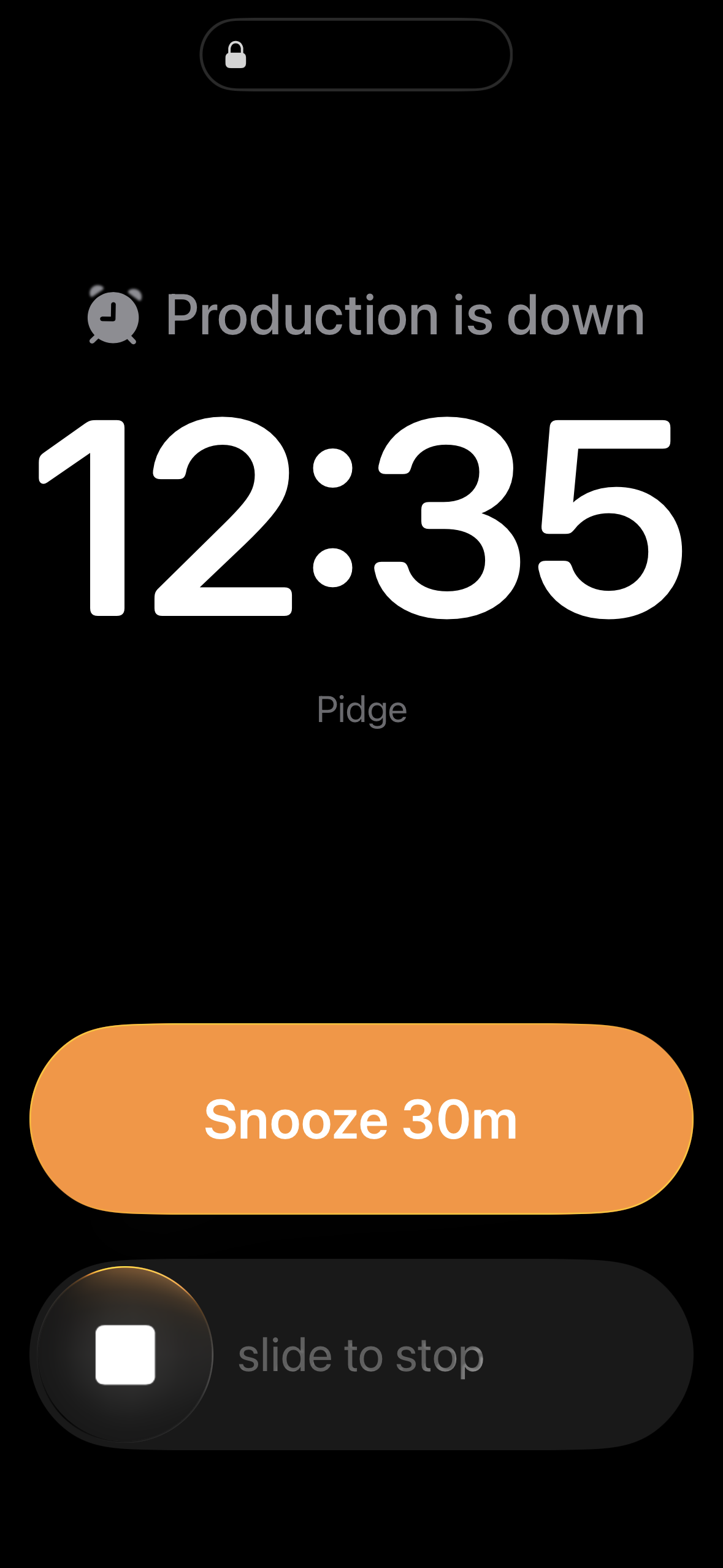
An urgent send shows its fuse up front, so you always know an alarm is coming — answer in time and it never rings. If it does, it's a real alarm: it breaks Silent mode and Focus.

A real iPhone alarm on the Lock Screen — "Production is down", with Snooze 30m and slide to stop

The machine is on your side.

  • Claim codes are single-use. Every re-claim rotates the key, cutting the previous holder off.
  • Face ID is enforced by the server, not the UI. Cancelling sends nothing.
  • Attribution is never authorization. Personas identify a session; they don't grant it power.
What agents can't do →

Why Pidge

Not another beep.
A round trip.

Two-way by design

Buttons and replies flow back to the sender — polling or signed webhooks.

Breaks through when it matters

Real AlarmKit alarms ring through silent mode and Focus.

Native on iPhone

Not a web wrapper. Native notifications and actions — Mac app on the way.

Live Activities

Long jobs sit on the Lock Screen and Dynamic Island with live progress — every agent on one card, never a pile of banners.

✓✓ both ways

Delivered, seen — and green once your agent actually processed your answer. Threads, presence, replies on anything.

Face ID on the scary stuff

Ship it, spend it, delete it — gated behind biometrics. Sealed channels add per-channel E2E.

Know who's talking

Every session signs with a stable name — Mint Kestrel, Moss Sparrow — and the thread marks the moment a new one takes over.

Reply like a person

Voice notes, dictation that lands as text, markup on the photo before it sends.

On your Lock Screen

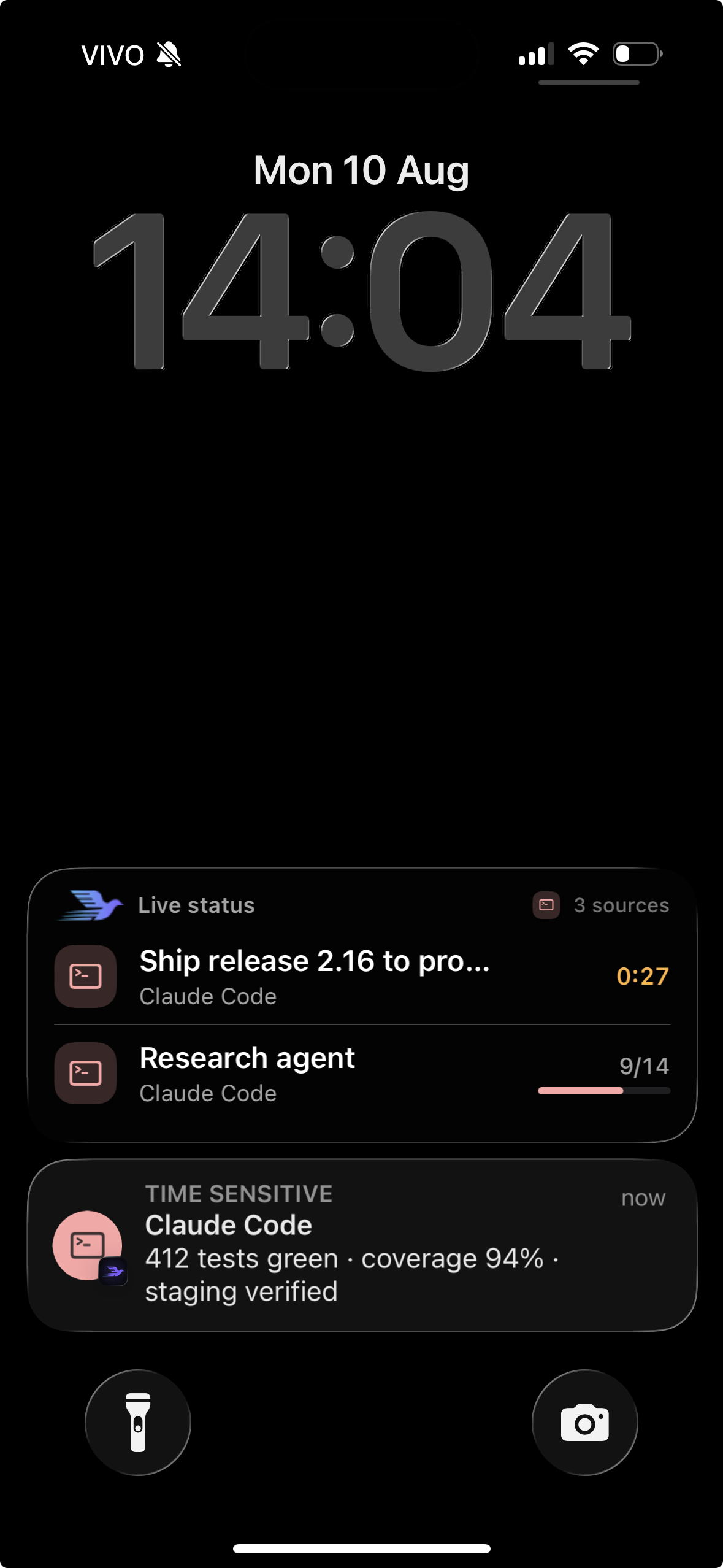
This is what it looks like at 2pm.

Every agent still working shares one card — plus the one that actually needs you.

A real iPhone Lock Screen — one Live status card holding two running agents, plus a Time Sensitive banner from Claude Code

Pricing

Built to be relied on.

Pidge is a full product: a server that owns the round trip — snooze timing, reply routing, signed webhooks — a native app, and Apple's plumbing (APNs, AlarmKit, Live Activities) kept working year after year. The subscription is what keeps the loop alive.

Starts with 30 days of full Pro · no card

Pidge

$19.99 / year · or $2.99/mo
  • Unlimited pidges, all delivery profiles
  • Real conversation: threads, presence, replies
  • Focus-breaking alarms + Live Activities
  • iPhone, native — Mac app on the way · sealed channels (optional end-to-end encryption)
  • 10 channels — one per agent
Start free

Pidge Pro

$49.99 / year · or $5.99/mo
  • Everything in Pidge
  • Unlimited channels — the whole flock
  • Group channels — invite your team
  • Per-channel profile tuning
Get Pidge Pro
At launch only

Founder license — $99.99 · lifetime Pro · 200 seats. No perpetual free tier — a product that has to page you at 3am can't be funded by hope. The 30-day Pro trial is the free tier.

FAQ

Fair questions.

Anything that can run a CLI command or POST to an HTTPS endpoint: Claude Code, Cursor, Codex, OpenAI Agents SDK, n8n, cron jobs, CI pipelines, your own scripts. The setup prompt teaches the agent the whole protocol.

Get Pidge

Put your agents on speaking terms.

Every account starts with 30 days of full Pro, free — no card required. Then $19.99/year (or $2.99/month). Setup is one paste — your agent figures out the rest.